Packing Tips: Smarter warehouse packing instructions

Talk to a fulfillment consultant today
Updated 2026
We’ve upgraded Packing Tips to improve order accuracy and streamline warehouse workflows as part of our Order Compliance Automation. This feature is built for omnichannel fulfillment, so you can set packing instructions by channel, retailer, SKU, or destination and pack every order to the right requirements, from DTC parcels to B2B retail shipments.
Build a tip once, apply it to the right orders
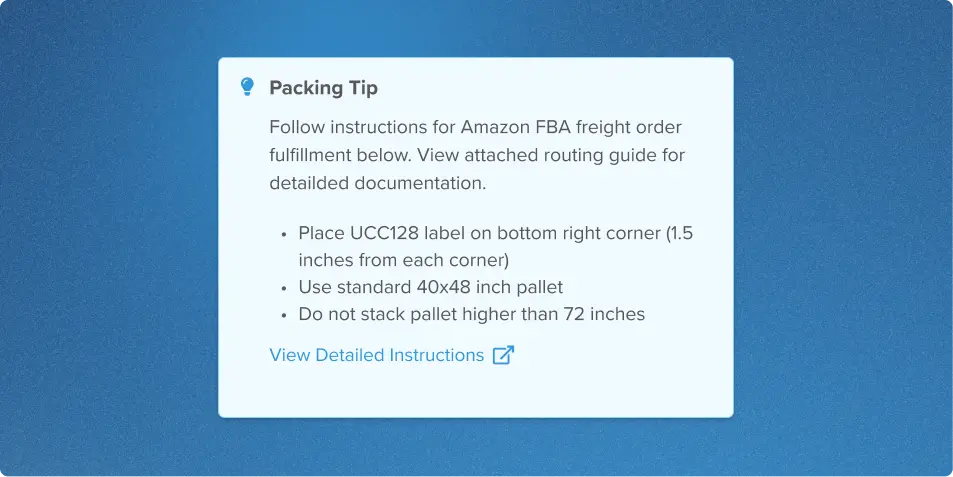
Create a packing tip with an order automation rule and the Set Packing Tip action. Choose when the tip appears based on a retailer, SKU, channel, destination, or any other order attribute that automation rules support. Then build the tip in a step-by-step editor with text, images, and links.
Setting one up follows a few steps:
- Go to Order Automation and create a new rule.
- Select the Set Packing Tip on Order action, and add your conditions.
- Build the tip with text, images, or links.
- Add any optional verification settings, then save.
Put instructions right at the pack station
When an order has a packing tip, the instructions appear during the packing process. This allows warehouse operators to review the requirements while preparing the order. A packing tip can also include a link to a retailer’s routing guide or other external documentation for additional detail.
Brands can view the packing tip in the Packing Tips section of the order page. Warehouse users can use the same order-level information while completing the packing workflow.
Confirm that important requirements were followed
For requirements that really matter, you can add optional checks:
- Verification Required: The warehouse user must confirm that they reviewed the packing tip before continuing.
- Photo Verification Required: The warehouse user must upload a photo before the order can be completed.
Support both retail compliance and everyday packing
Packing Tips aren’t just for B2B retail shipments. Apply them to any order that matches your automation conditions, including DTC orders that need special handling, packaging, inserts, labeling, or presentation instructions.
Get it right the first time
Packing requirements work best when they show up inside the packing workflow. Packing Tips put your instructions at the pack station and, when you want, require confirmation or a photo, so your team follows retailer, channel, SKU, and brand requirements more consistently. You also get greater visibility into how qualifying orders were packed.
Want every order packed to spec? Learn more about how Flowspace guarantees order accuracy.
Last Updated
Category
More product updates
Retail compliance with UCC labels and carrier rules
Inventory Allocation: Just-in-Time & Soft Allocation
Start simplifying fulfillment with Flowspace today
Discover how Flowspace can simplify fulfillment and help your brand scale faster, with no long-term contracts or hidden commitments.
