seller-integrations-TEST COPY
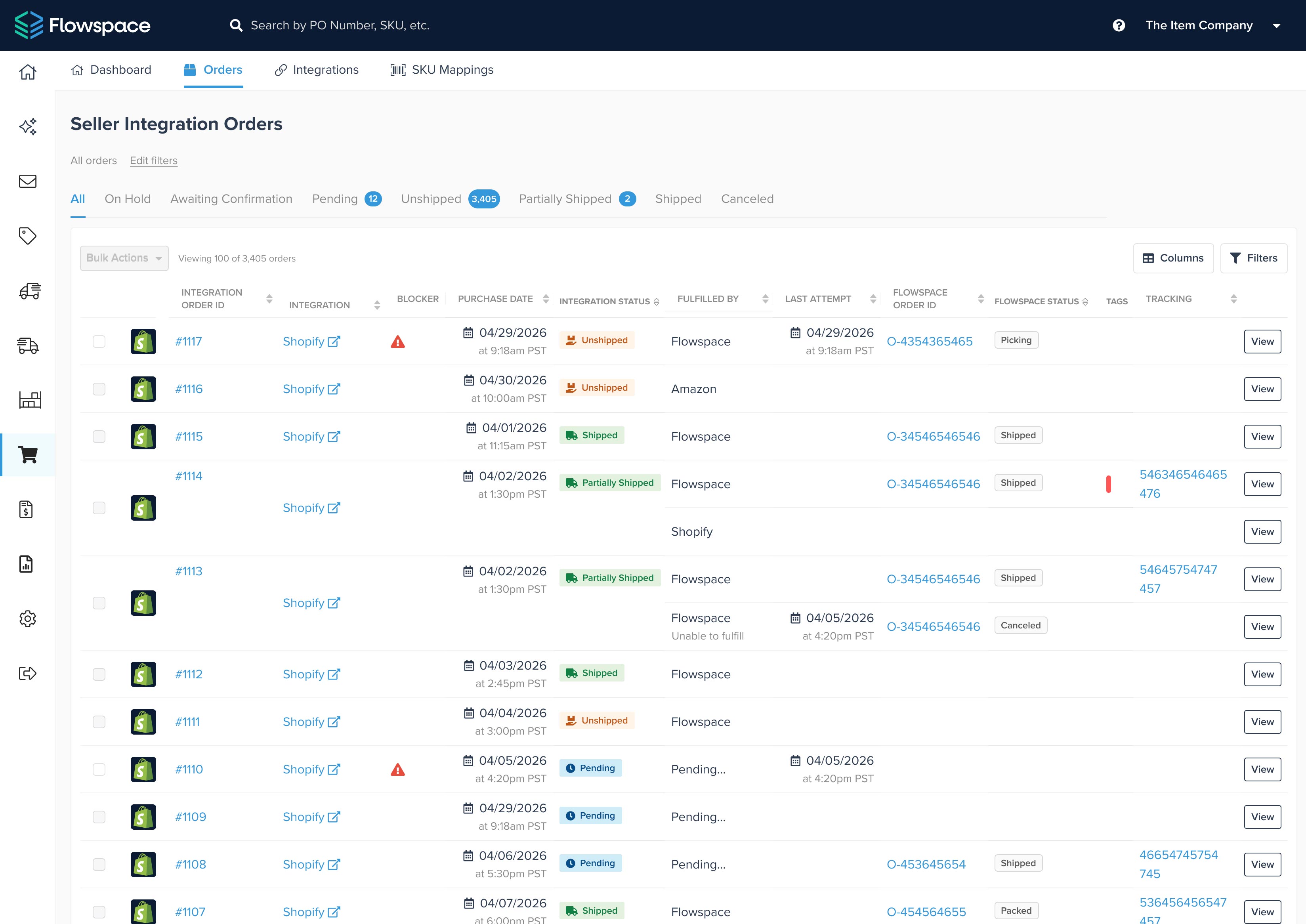
Flowspace has introduced a new Seller Integrations experience designed to make it easier to spot, understand, and resolve order issues.
The updated experience gives brands a clearer view of orders that need attention, explains what is blocking them in plain language, and provides self-service tools to resolve common issues without waiting on Support.
-
We’re introducing an updated Seller Integrations experience that makes it easier to spot, understand, and resolve order issues directly in the Flowspace platform.
You can now plainly see what’s preventing orders from moving forward and what to do next, with AI-generated suggestions to help guide resolution.
A new dashboard brings issues and recommended actions into one view, while expanded filtering, centralized SKU mappings, and new self-service tools help you resolve common problems without opening a support ticket.
See what needs attention first
[IMAGE: Orders table with the Blocker column visible and filters open.]
The new Seller Integrations Dashboard gives brands an at-a-glance view of order health across connected sales channels (Shopify, ShipStation, Amazon, and more).
Summary tiles highlight issues such as invalid SKU mappings, invalid addresses, and orders awaiting inventory. Brands can view everything together or filter to a specific integration, then click directly into the affected orders.
The Orders view also includes expanded filtering by status, SKU, integration, blocker type, dates, and more, making it easier to find exactly which orders need review.
Understand why an order is blocked
[IMAGE: Order Detail page showing the Validations panel and Resolve action.]
A redesigned Order Detail page makes it easier to see what is preventing an order from moving forward.
It includes clear validation checks for shipping addresses, SKU setup, inventory availability, and carrier requirements. If something needs attention, the page explains the issue and, where possible, provides an action to resolve it directly.
For example, brands can map an unmapped SKU, correct certain setup issues, or follow a direct link back to the sales channel to fix an address.
AI-powered recommendations help identify the next step
[IMAGE: Example of an AI recommendation]
The new Dashboard also uses AI-generated recommendations to help brands resolve common order issues faster.
For certain issues, Flowspace can suggest a specific action—such as matching an integration SKU to the appropriate Flowspace SKU or recommending a fulfillment start date. Brands review the recommendation before accepting it, and approved fixes can be applied across all affected orders at once.
When there is not a safe one-click fix, the Dashboard directs the brand to the relevant orders for individual review instead.
More self-service tools in one place
[IMAGE: Optional screenshot of the centralized SKU Mappings page, especially if the UI is visually strong.]
The release also adds several tools designed to simplify day-to-day order management:
- Centralized SKU mappings: Manage integration-to-Flowspace SKU mappings in one dedicated area.
- Bulk retry: Re-check multiple eligible orders after the underlying issue has been corrected.
- Clearer fulfillment status: Orders fulfilled outside Flowspace are now identified correctly instead of appearing as errors.
- Self-service reporting: Filter and export Seller Integration order data without requesting a custom report.
Resolve issues faster, with less back-and-forth
Seller Integrations now gives brands a clearer path from identifying an issue to resolving it.
Instead of simply seeing that an order needs attention, teams can understand what happened, see which orders are affected, and take action directly in Flowspace for many of the most common issues.
Last Updated
Category
More product updates

Start simplifying fulfillment with Flowspace today
Discover how Flowspace can simplify fulfillment and help your brand scale faster, with no long-term contracts or hidden commitments.
